Sunday, November 17, 2013

Week 6: The Roller Coaster Ride Through Assignments and Tasks


My journey through the interactive web has led me to this week’s roller coaster. These seven days have been filled with activities and things I was learning about and trying out on the go. But let’s start from the beginning.

The readings we covered this week were about Engaging Students and Technology Aids. I dedicated a special attention to a website that listed and explained many resources that can help to keep students actively engaged and minimize the time teachers spend grading, effectively and efficiently. 
I faced similar challenge with my upper-intermediate student essays that were sent through Edmodo. I still think that Edmodo did help me to instruct my students how to do the essay and how their essays will be evaluated. However, with all the work in my webskills class, the reading assignments and tasks, and completing the work for WebQuest I really had such a trouble finding time to read all the essays, grade them, and send the reports and feedback in Edmodo to my students. 

In order to engage students more in learning I think that Just-in-Time Teaching (JiTT) would work well with in my class. It  is a brilliant method to improve student learning and increase in-class teaching efficiency and effectiveness. "A key to successful JiTT implementation is developing a set of effective questions that will be posted online for students to answer before the next class. JiTT questions are generally open-ended and require students to do something - read a textbook chapter or article, analyze a video, complete a simulation, or analyze data - related to material that will be addressed during the next class period." Again, something to explore in Edmodo.

Another effective tool to engage students in learning introduced this week is Powerpoint Presentation (PPT). I have used it before, but I must admit that I have never paid special attention to so many interactive features it offers. I created one as quite a simple and short vocabulary quiz. I tried to experiment both with using hyperlinks and text-adding interactive options. The quiz is designed as a warm-up activity in which students will be able to revise some airport vocabulary and airport procedures previously covered in one of the intermediate classes. I wanted to use hyperlinks in order to guide my students to the correct answers until they finally get them even if they hadn't studied prior to the quiz.

a slide screenshot of my PPT presentation

As the week was coming to an end, my work was nearly done. I had worked hard  to complete my  my WebQuest and introduce it to the students.  But I’d better dedicate another post to this.

Wednesday, November 13, 2013

Week 6: Introducting Changes - WebQuest Pt1

Ideas, ideas, ideas! 
I had so many ideas how to make this first WebQuest for my intermediate students. I guess staying focused on one thing and making the best of it was the hardest part in the process. 

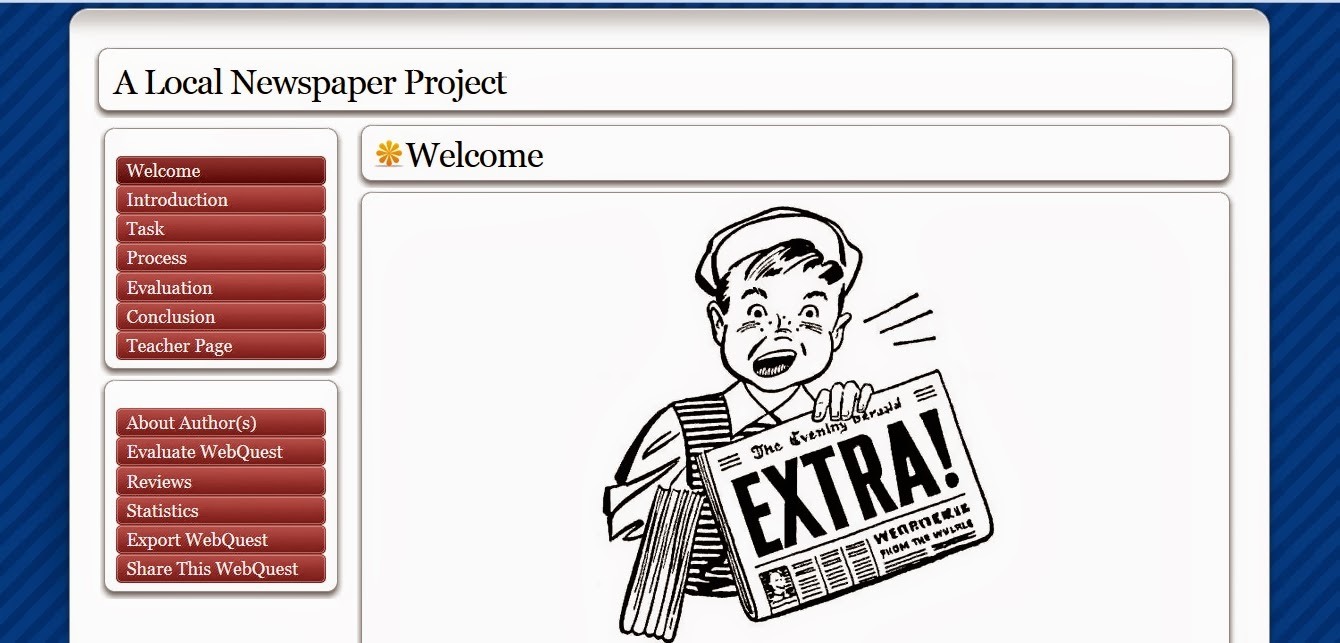
The WebQuest with the title A Local Newspaper Project is aimed to help my 10th graders (intermediate level) practice spelling and writing through a practical use of language. As I described to my colleagues in this webskills class, they are typical teenagers, who never seem to find time to practice at home, but usually find all the time in the world to surf the Net. 

A screenshot of my WebQuest homepage - http://zunal.com/webquest.php?w=220294


Yesterday I created a group for them in my Edmodo classroom, and will post the link for the WebQuest there first. We're having a class tomorrow, so I will give them additional explanation about it, since there are still students who haven't created an account in Edmodo.

I really look forward to this challenge and my students' feedback.

Friday, November 8, 2013

Week 5: Moving Forward


Week 5 is here with all its assignments and new tools to learn about and explore.

Most of the reading we had to do have put focus mainly on the term 'alternative' thus giving detailed insight about alternative learning through Project Based Learning and the concept of alternative assessment and rubrics. 

We learned the significance of Project Based Learning (PBL) through an example of  Susan Gaer and her article Less Teaching is More Learning. In my opinion, Project Based Learning gives an opportunity to students to take advantage of such elements as curiosity and independence as one of the key drives in a quest for new knowledge. In order to find the required information related to a project, students must be empowered to search autonomously and independently, even when given guidelines by the teacher. They are responsible for their learning and therefore, project objective(s) must be clear and appealing to students, whereas topics should be challenging and related to real-life. PBL can encourage students to learn independently, thus motivating them to gain not only more knowledge in a certain field, but also to better achieve language competences in an EFL classroom. 

A model completely new to me until this week was WebQuest. A WebQuest is an inquiry-oriented lesson format in which most or all the information that learners work with comes from the web. It was a great experience to read through examples of WebQuest from the Quest Garden  as well as to look up some of the WebQuests some of my colleagues in this course made. I'm thinking of creating one of my own, since my students could benefit from it in many ways. 

Another issue that was covered this week was alternative assessment and rubrics.  It was brilliantly presented in The Essentials of Teaching article. After considering all the aspects and different varieties of alternative assessment and rubrics, I have also created one for my discurssive essay  class, that I will post in my Edmodo virtual classroom.

Speaking about Edmodo, I now have 50 students in my two classes, and 22 + 19 essays turned in. Students were leaving comments and reacted postively to this new concept. I have also left a rubric so that they can know how their work will be evaluated. Morevoer, they will be able to use it for future discursive writing as well. 


Saturday, November 2, 2013

Week 4: Small Steps Can Take You Far if You Keep Walking

Already Week 4 and such a busy schedule that I almost forgot ever being outside the virtual classrooms. Now I have two of these to attend, which I will explain shortly.

After days of marathon-like classes in school and meetings concerning Hate Crimes Prevention Project with OSCE (Organization for Security and Cooperation in Europe) that four of my students and I are participating in together with representatives of the media, governmental and NGO sector in the town, it's good to be able to get online, and without a rush read through posts and comments by my colleagues in the Nicenet. The main objective for us was to learn particular ways how technology can enhance reading, writing and vocabulary skills. As before, there was a great variety of useful websites and links to explore and try to incorporate in our teaching. Moreover, this week was all about practicing writing technology enhanced lesson plans and using google docs to post them online in order to get feedback from the colleagues and the instructor.

I browsed through Bygosh.com - a family-friendly website with interactive books and short stories. Since it was Halloween this week, I thought it would have been nice to look for some materials to use with my students. Having opened "Scary Short Stories for October", I got a perfect idea to use it in the class with taking into consideration ABCD lesson objectives framework. A group of 25 intermediate high school (aged 15-16) students (Audience) will choose from the website list (Condition) one short story to read (Behavior) and then provide the story map with 6 most important details about the story (Degree).

Another idea was to use Huffington Post Live. The website gives a possibility of having an interactive realia used for both listening, reading comprehension and writing. You can find a certain topic/show and the time when it will be broadcasted, as well as additional reading with it. For instance, I found the show with the topic "Tell me Why ScaryMovies"  that will feature a guest who is a 10-year old horror movie enthusiast. The show is provided with additional information sections such as LOOK: Forgotten Horror Movies You Should Revisit READ: 10 Best Scary Movies To Watch This Halloween SCARY: 10 Maniacally Mind-Twisting Movies. You can also join the chatting community and discuss the topic with other viewers. I think my students would be quite interested in listening and watching the show, as well as reading the additional information and commenting.

 However, one of the major endeavors for this week for me was first getting familiar with the use of and introducing Edmodo to my students. I created two groups for my upper-intermediate classes, got group codes for each so that students could join. 


 My Teacher's Profile on Edmodo
The platform does remind of Facebook, and I first used it to post a note with a link of the website (http://idebate.org/motions) where I wanted my students to choose a topic for a discursive essay that they would have to write. I also uploaded a pdf document where they could also choose a topic. Next was creating assignment with a deadline.


 So far, 37 out of 50 students have joined the group, filled in their profile and provided details about what kind of learners they are (aural/visual/hands-on) and what their career goals are. 4 students have posted some questions and comments and, one student has turned in his essay already.


A Student's Profile on Edmodo


I really look forward to their feedback about the things they have done so far.  


Friday, October 25, 2013

Week 3: New Materials, New Ideas


It’s Friday, and I’m finally home. I got back to my classroom this week, and I couldn’t wait to try out some of the ideas I got after doing a part of my assignments for the Week 3.

The focus was on aural/oral skill building. I read two articles posted on the class wiki page from which I learned in what ways computer-based environment can enable learners to be exposed to a real audience. One article was about CALL for listening skills by Lindsey Miller, while the other was about CALL for speaking skills by Julia Gong.

As before, there was a list of websites to check out and possibly use in an EFL classroom. I discovered a couple of quite useful ones. 

First I'd like to mention is  ListeningRealEnglish which provides lessons with real-life videos about certain topics. I decided to use Lesson 47for learning USED TO + verb form with my intermediate class this week. I thought it might be a refreshing lesson, since the students would be able to hear and see a variety of English speakers using the same form in a street survey. 


I used it with a group of 20 intermediate students and they responded really well. It was very easy for them to catch the form, and I also adjusted the lesson plan a bit so that it could suit more this particular group. Unlike in the lesson plan on the page, one of the objectives was for the group (Audience) to write down (Condition) 2-3 original sentences that the people in the video say using the form USED TO (Degree). They thought the video was funny and some of them could have relate to the things said. The sentences were not very long and it was fairly easy to note them down.

Apart from this website I'll most probably use some of the materials from Randall's ESL Cyber Listening Lab, but also from NPR, which
  is a great place for finding a number of different topics discussed in real radio shows recorded for the general audience, and not those specifically created for EFL learners.
I liked two radio shows:
1)      a photo story about a father and son from Northern Ireland http://www.npr.org/blogs/pictureshow/2013/06/14/191059207/like-father-like-son-creating-art-in-a-time-of-troubles; and
2)      an interview with two female award-winning photo journalists http://www.npr.org/blogs/pictureshow/2013/10/16/234929633/behind-the-lens-with-prize-winning-women-of-vision.

I'm planning to use both in my upper-intermediate class to enhance their listening skills. 

Week 3 Assignments also included introduction to another rather useful website - Delicious.com. It is such a fabulous bookmarks manager that provides a clear and simple way of  storing favorite links in one place. The links that you store can be public or private, and there are options for creating tags and a short description for each link. Moreover, there is a possibility of networking with other users, which I find quite useful as well.


  A NEW CHALLENGE 

Being in a webskills class has made me think more and more about how I could apply computers for language learning in my classroom. A month ago, out of sheer curiosity, while browsing through education apps offered in the App Store, I downloaded an application called Edmodo. I had completely forgotten about it, but today, it just somehow came to my mind.  Edmodo is a social learning platform for teachers, students, and parents. It looks quite similar to Facebook (which most of my students cannot live without), and I decided to try to use it with my upper-intermediate students. The initial idea is to use it for collaborating and submitting discursive essays. The students will have to write such an essay for their mid-term exams, so using Edmodo can turn out to be quite useful. Nobody has done anything similar in my school and I fear I might get some criticism from my colleagues and/or parents. I’ll introduce Edmodo to my students next week. I already created an account for myself, signed up my school in the register and created three groups for students. 
The challenge is on!

Saturday, October 19, 2013

Week 2 - Summary

This week has passed so quickly, with so many things to experience and learn. Due to my trip, I had to manage to read the materials for the class on-the-go, often while having a cup of coffee at the train station somewhere between Aachen and Cologne.

What matters is that I did it. Or at least I hope I did.
First, there was a Noodletools website that provided a list of search engines, most of which, I must admit, I had never heard of before. I went through a number of these, realizing how narrow and limited my cyber-world-search has been so far.
I chose
  1.  http://www.newsnow.co.uk/h/  - Newsnow.com,  
  2. http://www.pressdisplay.com/pressdisplay/viewer.aspx - Pressdisplay.com and
  3.  http://www.newseum.com/  - Newsuem.com.
In order to show their strengths and/or weaknesses, I used as the keyword  “cloning”. 

To my great surprise, the site which provided no information was Newseum.com. The second I used was Newsnow.co.uk, which gives you a list of newspaper articles from all over the world that deal with the searched topic, starting from the latest published one. At Pressdisplay.com site you can filter your search by narrowing your search to particular country, language in which it was published, author of the article, the relevance, etc.
After I had explored these, I wanted to try some other websites. I found http://www.academicinfo.net/ - Academicinfo.net quite useful, giving a variety of relevant links.

Next to learn this week was writing  learning objectives using ABCD framework. The most useful when doing the task of writing my own class objective was the slide show that relates to using ABCD model with achieving an IT goal. http://www.slideshare.net/ashleytan/writing-specific-instructionallearning-objectives-presentation .


According to  ABCD method this is an excellent starting point for writing objectives. In this system, "A" is for audience, "B" is for behavior, "C" for conditions and "D" for degree of mastery needed.
1.     Audience (A) – Who? Who are your learners?
2.    Behavior (B) – What? What do you expect them to be able to do? This should be an overt,    observable behavior, even if the actual behavior is covert or mental in nature. If you can't see it, hear it, touch it, taste it, or smell it, you can't be sure your audience really learned it.
3.    Condition (C) – How? Under what circumstances or context will the learning occur? What will the student be given or already be expected to know to accomplish the learning?
4.     Degree (D) – How much? How much will be accomplished, how well will the behavior need to be performed, and to what level? Do you want total mastery (100%), do you want them to respond correctly 80% of the time, etc. A common (and totally non-scientific) setting is 80% of the time.

Monday, October 14, 2013

Week 2: On the Road but Still in the Class


It’s Sunday night, 10 pm and I am typing this from my hotel room in Duren, Germany, but I will probably not be able to post this before some time tomorrow. I arrived at Duren late today, with a group of 14 students and a colleague for a one-week return visit to our German partners in the International Student Exchange Project. 

The project started in fall 2009, and resulted  in a successful partnership between Gimnazija "Mustafa Novalić", Gradačac and Gymnasium am Wirteltor, Duren. The aim is to bring together groups of students from both schools to learn about other culture and every-day life, practice using English and German, and above all make long-lasting friendships. The team of two teacher-coordinators from Germany -Michaela Berard and Haris Zahirović and the Bosnian team - my colleague, Raif Omeragić and I,  have put a great effort to keep the Project and the partnership going. In 2014, the project will be officially funded by the German Embassy in Bosnia and Herzegovina. 

                     Monday Morning - The Bosnian Team in front of the famous Kölner Dom

I haven’t slept at all last night, since the trip from Bosnia to Germany was quite long.  First, we had to start off at 2 am local time and then take a 4-hour bus ride to the International Airport in the Croatian capital, Zagreb. We got there around 6 am, and boarded the plane at 8:30 am. The fog at the Cologne International Airport made us hover in the air for some time, before finally arriving safely to the arms of our German hosts. We’ll be staying here until Friday with a quite busy schedule – we’ll be attending classes in the school, have a meeting with the principal, then the official reception at the Office of the Mayor of the City of Duren, and in between these activities, we’ll go sightseeing in Duren, Cologne and Aachen. However, the aim is also for the students to have fun and enjoy their stay at the host families.

I am quite worried that this tight schedule will affect my assignments for the Webskills Course Week 2. I have encountered some problems so far, although I thought that I could manage pretty well.

The first bad thing is that I do not have an internet connection in my room. It seems strange, but this is some kind of old-people’s home and I still haven’t figured out the way where to get online while staying here. I’ll try to look for a place in the morning and probably go online in the school, hoping that this will not disturb the schedule my colleagues already made.

To reflect on the Week 1 I must admit that it was rather demanding for me. I have no experience in e-learning, and getting familiar with the use of the proposed tools was interesting and yet at times stressful.

I like the idea of using Nicenet where all the participants in the course can interact and discuss the topics we’re introduced by our webskills instructor Sean McCelland. It was nice to learn who are the people behind the names in the class by visiting their newly created blogs and introductions they posted in our class Nicenet conferencing. 
The only issue I couldn’t deal with, and in a way still can't, is posting my name and a blog link to the class wiki page. I have tried contacting the instructor and doing the suggestions that other class participants recommended (i.e. to sign out completely from the wiki page and gmail account and log back in again) but nothing seemed to work. 
Can it be that difficult?